
KIỂM DỊCH THỰC VẬT XUẤT KHẨU (PHYTOSANITARY): QUY TRÌNH CHI TIẾT VÀ HỒ SƠ CẦN CHUẨN BỊ

ASL Logistics

New member

Tìm hiểu quy trình kiểm dịch thực vật xuất khẩu chi tiết, hồ sơ cần chuẩn bị và lợi ích của phyto. ASL Logistics hỗ trợ bạn quy trình và thủ tục nhanh chóng, chi phí hợp lý!

Kiem%20dich%20thuc%20vat.png


1. Kiểm Dịch Thực Vật Xuất Khẩu Là Gì?

Kiểm dịch thực vật (Phytosanitary) xuất khẩu là một quy trình quan trọng nhằm đảm bảo hàng hóa xuất khẩu không mang theo dịch bệnh nguy hiểm ảnh hưởng đến thực vật như virus, côn trùng hoặc mầm bệnh. Đây là yêu cầu bắt buộc đối với nhiều loại hàng hóa, nhằm tránh lây lan dịch bệnh giữa các vùng, đồng thời đảm bảo điều kiện để hàng hóa được thông quan và xuất khẩu hợp pháp.

Nếu lô hàng nằm trong danh sách bắt buộc kiểm dịch mà không có giấy tờ chứng minh, quá trình làm thủ tục tại hải quan có thể bị đình trệ, gây ảnh hưởng đến tiến độ giao hàng.

1.1. Phyto là gì?

Phyto là cách gọi tắt của cụm từ đầy đủ Phytosanitary Certificate, tức là giấy chứng nhận kiểm dịch thực vật. Chứng thư này được cấp để chứng minh hàng hóa đã đáp ứng đầy đủ yêu cầu kiểm dịch thực vật khi xuất khẩu hoặc nhập khẩu.

1.2. Các loại Phyto

Về cơ bản, Phyto được chia thành hai loại:
​
  • Phyto hàng xuất khẩu: Cấp cho hàng xuất đi các nước, đảm bảo lô hàng đạt tiêu chuẩn kiểm dịch.​
  • Phyto hàng nhập khẩu: Cấp cho hàng nhập về, đảm bảo hàng hóa không mang mầm bệnh nguy hiểm.​
Nội dung của Phyto xuất khẩu và nhập khẩu có sự khác biệt nhưng đều bao gồm các thông tin quan trọng như:
​
  • Tên và địa chỉ người gửi/người nhận​
  • Tên khoa học của thực vật​
  • Khối lượng, số lượng bao bì​
  • Phương tiện vận chuyển, cửa khẩu nhập​
  • Ngày kiểm tra và xác nhận của cơ quan kiểm dịch​
phyto.png


Giấy Chứng Nhận Kiểm dịch thực vật mẫu

Để đảm bảo hàng hóa đáp ứng đầy đủ các tiêu chí kiểm dịch thực vật, doanh nghiệp cần thực hiện theo các bước dưới đây:

Bước 1: Chuẩn Bị Hồ Sơ

Bộ hồ sơ kiểm dịch thực vật bao gồm:
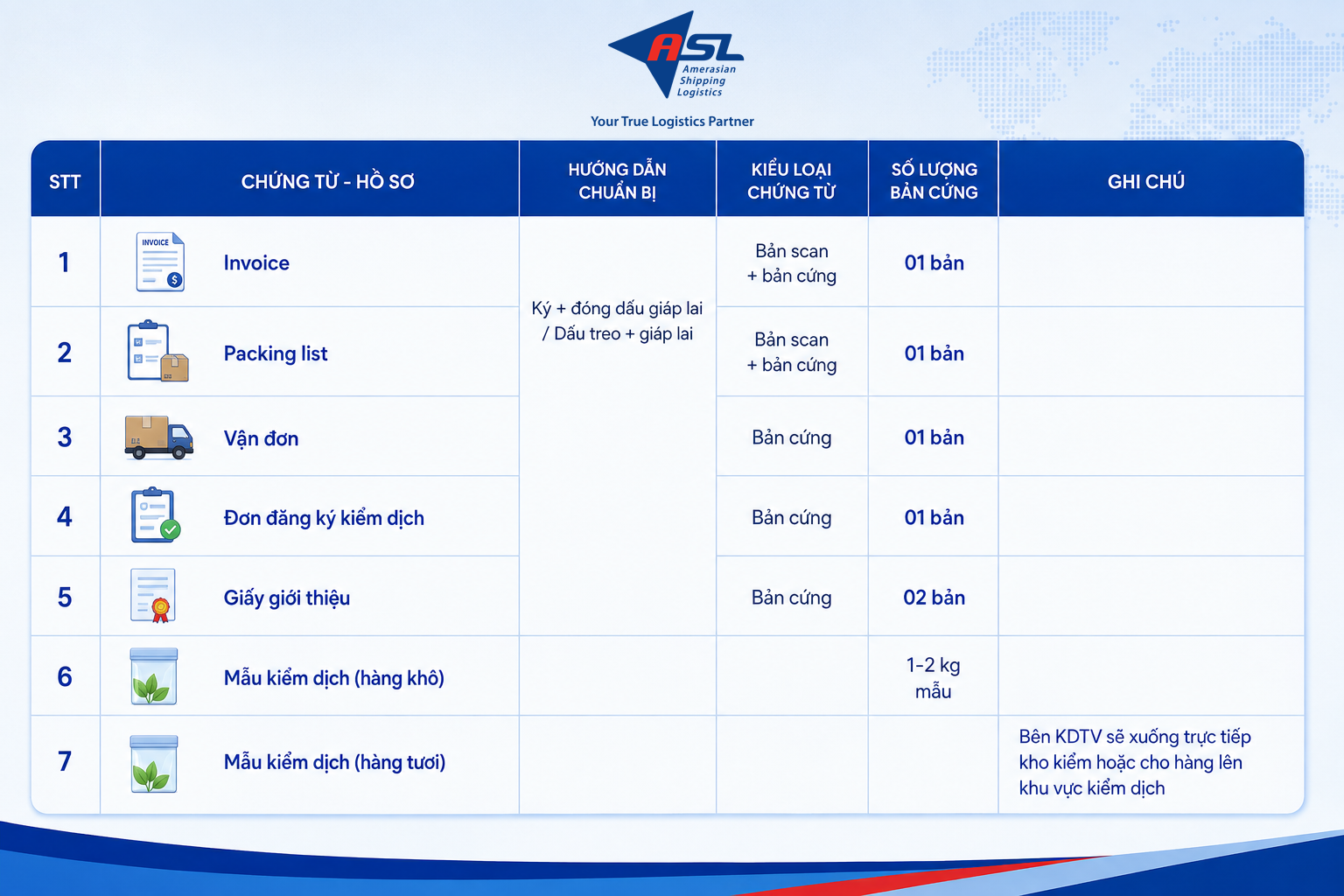
bo-ho-so-kiem-dich-thuc-vat.png


Bước 2: Khai Báo Kiểm Dịch

Doanh nghiệp thực hiện khai báo kiểm dịch trên hệ thống Một Cửa Quốc Gia hoặc PQS (tùy theo quy định).

Bước 3: Đăng Ký Giấy Phép Nhập Khẩu (Nếu Cần)

Trong trường hợp hàng hóa thuộc nhóm cần Giấy Phép Nhập Khẩu (GPNK), doanh nghiệp cần đăng ký để được cấp phép.

Bước 4: Xuất Đơn Đăng Ký Kiểm Dịch

Sau khi khai báo kiểm dịch, doanh nghiệp cần xuất đơn đăng ký kiểm dịch để tiếp tục các bước kiểm tra thực tế.

Bước 5: Kiểm Tra Thực Tế Hàng Hóa

Cơ quan kiểm dịch sẽ tiến hành lấy mẫu và kiểm tra thực tế hàng hóa tại kho chủ hàng hoặc cửa khẩu. Việc này giúp đánh giá tình trạng hàng hóa và đảm bảo không mang mầm bệnh nguy hiểm.

Bước 6: Hoàn Thiện Hồ Sơ Kiểm Dịch (Đối Với Hàng Xuất Khẩu)

Sau khi tàu chạy, doanh nghiệp bổ sung vận đơn nháp để hoàn thiện hồ sơ kiểm dịch.

Bước 7: Cấp Chứng Thư Kiểm Dịch

Chi cục kiểm dịch thực vật phát hành Chứng thư kiểm dịch hàng hóa, hoàn tất thủ tục xuất khẩu.

3. Lợi Ích Của Kiểm Dịch Thực Vật

Kiểm dịch thực vật không chỉ là một yêu cầu pháp lý mà còn mang lại nhiều lợi ích quan trọng:
​
  • Đảm bảo chất lượng hàng hóa: Hàng hóa được kiểm dịch giúp giảm rủi ro nhiễm bệnh, nâng cao chất lượng khi xuất khẩu.​
  • Tạo thuận lợi trong thương mại quốc tế: Các nước nhập khẩu yêu cầu giấy chứng nhận kiểm dịch thực vật để đảm bảo an toàn.​
  • Tránh các rủi ro pháp lý: Tuân thủ đúng quy trình giúp doanh nghiệp không bị đình trệ hàng hóa hoặc chịu phạt do vi phạm quy định kiểm dịch.​
4. Mối Quan Hệ Giữa Kiểm Dịch Thực Vật Và An Toàn Thực Phẩm

Kiểm dịch thực vật có vai trò quan trọng trong việc đảm bảo an toàn thực phẩm:
​
  • Truy xuất nguồn gốc thực phẩm: Kiểm dịch giúp kiểm soát chất lượng hàng hóa từ khâu sản xuất đến tiêu dùng.​
  • Đảm bảo an toàn thực phẩm có nguồn gốc thực vật: Ngăn chặn các mầm bệnh nguy hiểm ảnh hưởng đến sản phẩm nông nghiệp.​
  • Kiểm soát chất lượng thức ăn chăn nuôi (TACNTS): Đảm bảo nguồn thức ăn chăn nuôi sạch, an toàn cho động vật và sản phẩm đầu ra.​
5. Dịch vụ kiểm dịch thực vật tại ASL Logistics

Nếu doanh nghiệp gặp khó khăn trong việc thực hiện các thủ tục kiểm dịch thực vật, ASL Logistics là đối tác đáng tin cậy giúp bạn giải quyết vấn đề. Chúng tôi có đội ngũ chuyên gia nhiều kinh nghiệm, tận tâm và trung thực, luôn đặt lợi ích khách hàng lên hàng đầu.

Lợi ích khi lựa chọn ASL Logistics

✅ Tư vấn miễn phí về quy trình kiểm dịch thực vật
✅ Hỗ trợ khai báo nhanh chóng trên hệ thống điện tử
✅ Đảm bảo hàng hóa thông quan đúng tiến độ
✅ Chi phí hợp lý, cam kết dịch vụ chuyên nghiệp​
-----

⚓ ASL Logistics - Your True Logistics Partner
📍 www.asl-corp.com.vn
📞 Hotline: 093 778 8909
☎ 028 3512 9759 EXT: 123
✉ pricing@asl-corp.com.vn​

 
Enjoy a more convenient way to watch entertainment by connecting Netflix to your smart TV. Follow the Netflix activate TV activation process and use the current code displayed by your television.
When a compatible TV asks you to connect Netflix, the activation page can help complete the process. Visit Netflix activate TV enter the displayed code, and follow the account verification prompts.
Netflix activate TV is a helpful destination for viewers who need to complete device linking. Keep your television and another internet-connected device ready to finish the activation steps.
Setting up Netflix on a television is a practical way to enjoy content from your home entertainment area. Follow the code-based procedure at Netflix activate TV whenever your TV requests activation.
The activation code shown by your television connects the device with your Netflix account. Use Netflix activate TV to submit the code and complete the setup according to the displayed instructions.
 
Netflix activate TV offers a convenient step for viewers who want to connect their accounts to supported TVs. Follow the activation directions, enter the displayed code, and wait for confirmation.
If you have installed the Netflix app on a compatible television, you may need to complete account activation. Use Netflix activate TV to enter the code and connect your existing account.
Enjoy films, documentaries, and series on your television after completing the required Netflix setup. Netflix activate TV helps users follow the device code procedure for supported screens.
Netflix activate TV account linking on a television can be completed without unnecessary confusion. Open the activation page on a separate device, enter the code from your TV, and follow the official prompts.
A new smart TV can become part of your home entertainment setup with Netflix. Follow the Netflix activate TV instructions to verify the activation code and connect your account to the device.
 
When you want to use Netflix on another television, the device may ask you to verify the connection. Visit Netflix activate TV and follow the code-entry procedure shown on your screen.
Connecting a compatible TV with Netflix gives viewers another convenient way to access their account. Use Netflix activate TV to complete the activation process whenever the television displays a linking code.
If the Netflix app asks for a code, keep your television screen open while completing the setup. Visit Netflix activate TV using a browser on another device and follow the activation prompts.
Netflix activate TV is a useful option for completing television activation through a device code. Enter the code provided by the TV and follow the official steps to link your Netflix account.
A comfortable viewing setup begins with connecting the streaming application correctly. Use Netflix activate TV to complete the account verification process and prepare your compatible television for streaming.
 
Watching Netflix through your television can make entertainment easier to enjoy with others. Follow the Netflix activate TV setup instructions to link your account with a compatible screen.
The television linking procedure is useful when opening Netflix on a new device. Enter the current code at Netflix activate TV and follow the instructions to finish connecting your account.
Netflix activate TV helps simplify the code-based setup experience for supported television users. Keep the activation screen visible, enter the correct code, and follow the instructions to proceed.
If you want to enjoy Netflix using a larger screen, make sure your TV supports the application. Open Netflix and use Netflix activate TV when the device requests an activation code.
The Netflix television activation process connects your account with a compatible viewing device. Visit Netflix activate TV on another screen, enter the code displayed on the TV, and complete the setup.
 
Netflix activate TV is relevant for users who receive a television activation prompt from the Netflix app. Complete the code verification procedure using a separate device and your existing account.
Your smart television can provide access to Netflix once the account connection is complete. Follow the instructions at Netflix activate TV and make sure you use the latest code shown on your screen.
Before starting Netflix activation, ensure that your TV is connected to a reliable network. Open the app, note the code, and use Netflix activate TV to complete the linking process.
Netflix activate TV provides a straightforward way to continue the setup process when a television displays an activation code. Follow the official prompts to connect the device with your account.
Connecting Netflix to your television can help create a more enjoyable home viewing environment. Use the activation code displayed on your compatible TV and enter it through Netflix activate TV
 
Netflix television activation is a useful feature for connecting accounts to supported screens. Visit Netflix activate TV enter the code displayed by your TV, and follow the remaining setup instructions.
A television connected to Netflix gives you a convenient way to explore available streaming entertainment. Complete the account-linking process through Netflix activate TV whenever your device requests verification.
Netflix activate TV can guide users through the code-entry stage of television setup. Keep the activation code visible and enter it carefully using a separate browser-enabled device.
Getting Netflix to work on your smart TV begins with following the correct device instructions. Use Netflix activate TV to complete the account connection after the television displays its activation code.
The Netflix TV setup procedure is designed to connect supported devices with an existing account. Enter your displayed code at Netflix activate TV and follow the official verification steps.
 
Netflix activate TV helps viewers understand the steps involved in linking their accounts to compatible televisions. Use the activation code supplied by your device to continue the setup.
A connected Netflix television makes it easier to enjoy streaming from your preferred room. Follow the code-based activation instructions at Netflix activate TV and complete the account setup.
When Netflix displays a code on your TV, it is part of the device connection procedure. Enter that code at Netflix activate TV and follow the directions to associate your account.
Users can complete Netflix TV activation with a few guided steps. Open the Netflix application, visit Netflix activate TV on another device, and enter the current code shown on the television.
Netflix activate TV is useful for connecting Netflix to supported television screens through account verification. Follow the instructions carefully to avoid entering an expired or incorrect activation code.
 
For anyone experiencing the Netflix TV setup screen for the first time, the activation process is easy to follow. Enter the television code at Netflix activate TV and complete the requested steps.
Netflix television access starts with a successful connection between your account and supported device. Use Netflix activate TV to complete activation and follow the instructions provided by the app.
When setting up a television for Netflix streaming, use the activation instructions displayed on the device. Netflix activate TV allows you to enter the required code from another internet-connected screen.
Netflix activate TV helps users complete the television activation process in an organized way. Make sure the code is accurate, follow the instructions, and check your TV for connection confirmation.
A smart TV offers a comfortable way to explore streaming entertainment at home. Connect Netflix by following the device instructions and entering your activation code through Netflix activate TV
 
Netflix activate TV is useful when your compatible television requires a code to connect your account. Keep your browser open on another device and complete the activation steps as instructed.
Enjoy streaming entertainment through a compatible television by completing the Netflix setup process. Visit Netflix activate TV enter the device code, and follow the prompts until the connection is confirmed.
The Netflix activation process can help connect your existing account with a new television. Open the app, note the displayed code, and use Netflix activate TV to finish the device setup.
Netflix activate TV provides a code-entry step for viewers who are connecting supported television devices. Follow the instructions displayed by Netflix and make sure you enter the correct activation code.
A properly connected television makes accessing Netflix more convenient during your free time. Complete the activation process at Netflix activate TV when requested by your smart TV application.
 
Netflix television activation helps users connect supported devices without repeatedly entering account details on the TV. Follow the official Netflix activate TV process and complete the displayed instructions.
Set up your preferred streaming service on a compatible television by following the Netflix activation procedure. Use Netflix activate TV to submit the code shown by the application and connect your account.
Netflix activate TV is a convenient starting point for completing account linking on supported TVs. Enter the device code carefully and follow the official prompts to finish the setup.
For a better home entertainment experience, connect your Netflix account to a supported smart TV. Follow the activation instructions and use Netflix activate TV whenever your television requests a code.
The Netflix code-based activation method helps link a compatible device with an account. Visit Netflix activate TV from your browser, enter the code shown on your television, and complete the process.
 
Netflix activate TV helps viewers complete the setup process for supported television devices. Use the code provided by the Netflix app and follow the account verification directions to continue.
Watching Netflix on your TV can be convenient after the device has been linked successfully. Enter the activation code through Netflix activate TV and wait for the app to confirm your account.
A simple television setup can make your streaming routine more comfortable. Open Netflix on your compatible TV, follow the activation prompt, and complete the code-entry process at Netflix activate TV
Netflix account holders can use the television activation process to connect supported screens. Visit Netflix activate TV submit the current code, and follow the instructions to complete device linking.
Netflix activate TV is associated with the process of activating Netflix on compatible TVs. Use the code displayed by your television and follow the official instructions to connect your account securely.
 
When a Netflix device asks for account linking, you can complete the procedure through a browser. Visit Netflix activate TV enter the displayed code, and follow the remaining instructions.
Netflix activate TV makes it easier to understand the television activation procedure for compatible devices. Keep your account ready and use the current code displayed on the television screen.
A supported television can become a convenient place to watch Netflix movies and series. Complete the account connection through Netflix activate TV by following the prompts provided by your device.
The Netflix television setup process is useful when adding a new screen to your streaming routine. Enter the activation code at Netflix activate TV and follow the instructions to connect your account.
If you want to access Netflix from your television, start by opening its official application. Follow the setup prompts and use Netflix activate TV to complete the device activation when requested.
 
Make the most of your compatible smart TV by connecting your Netflix account correctly. Visit Netflix activate TV when an activation code appears and complete the linking process.
A Netflix activation request usually provides a code on your television screen. Keep the code available, open Netflix activate TV on another device, and follow the instructions to connect your account.
For viewers who prefer watching on a television rather than a phone, Netflix setup is an important step. Use Netflix activate TV to complete the code verification required by your supported device.
Netflix activate TV helps users follow the television activation process with clear code-entry instructions. Make sure your TV is online and submit the correct code to finish linking your account.
Connecting Netflix with your television can improve the convenience of your home streaming setup. Follow the official instructions at Netflix activate TV and complete the activation using your displayed device code.
 
Netflix television activation is a simple process when the instructions are followed in order. Open the app, obtain the current code, and complete the setup through Netflix activate TV
Use Netflix activate TV when your compatible television displays a code for account linking. Enter the code through a separate device and follow the instructions until the setup is complete.
Enjoy a convenient streaming experience by connecting your Netflix account to a supported TV. The Netflix activate TV activation procedure helps complete the connection through a displayed code.
Netflix activate TV can assist viewers who are learning how to link their accounts with television devices. Follow the code verification process and use the official instructions provided by Netflix.
A reliable network and an updated Netflix application can help make television setup smoother. Once your TV displays a code, visit netflix.com/tv2 to complete the activation steps.
 
Netflix activate TV is a helpful resource for completing device activation when prompted by a compatible TV. Follow the official directions and make sure your activation code has not expired.
Enjoy a larger-screen streaming experience by connecting your Netflix account to a compatible television. Visit Netflix activate TV enter the displayed code, and finish the setup by following the prompts.
When Netflix needs to verify a television device, it may display a temporary code. Use Netflix activate TV to submit that code and complete the account-linking process.
The television activation process makes it easier to connect a supported screen with Netflix. Open Netflix activate TV on a separate device and follow the code-entry instructions carefully.
Netflix activate TV offers a convenient way to continue setting up Netflix on compatible televisions. Enter the code from your TV screen and follow the official steps to connect your account.
 
Getting your Netflix account connected to a television can take only a few guided steps. Open the app, note the code, and enter it through Netflix activate TV to continue.
A new device may require verification before Netflix can be used on its screen. Visit Netflix activate TV enter the code shown by the television, and follow the account connection steps.
Netflix activate TV provides a convenient code-based step for connecting compatible television devices. Enter the code displayed by your TV and follow the official instructions to complete setup.
Set up Netflix on your television and enjoy browsing available entertainment on a larger display. Use Netflix activate TV when prompted to enter the activation code supplied by the device.
If you are having difficulty connecting Netflix to your TV, first check your internet connection and app status. Request a fresh code if needed, then use Netflix activate TV to try again.
 
When you open Netflix on a compatible television, you may see a prompt to link your account. Visit Netflix activate TV and enter the code to complete the required verification.
If Netflix is not yet linked to your television, check whether the app displays a setup code. Use Netflix activate TV to enter the code and follow the official account connection process.
Make your home entertainment setup more convenient by connecting Netflix to a compatible television. Visit Netflix activate TV when prompted and complete the device-linking process using the displayed code.
If your television is waiting for Netflix activation, check the code shown in the app. Visit Netflix activate TV from another device and follow the instructions to complete the connection.
If you are switching to a different smart television, you may need to connect Netflix again. Follow the instructions shown in the app and use Netflix activate TV to complete device activation.
 
For viewers setting up Netflix at home, understanding the activation steps can save time. Use Netflix activate TV to enter the device code and follow the account-linking instructions carefully.
If Netflix displays a device activation code on your television, you can use Netflix activate TV to continue the setup. Enter the correct code and follow the instructions to associate your account with the supported device.
Netflix users can connect supported smart televisions by following the instructions provided within the app. Visit Netflix activate TV submit the displayed activation code, and complete the required steps.
Netflix activate TV helps make the television connection process more understandable for users. Follow the instructions provided by the Netflix app and enter the displayed code accurately to complete setup.
 
For a smooth Netflix viewing experience, make sure your television application is updated and connected to the internet. Use Netflix activate TV when prompted to finish the account-linking process.
Netflix television setup can be completed with the help of a separate phone, tablet, or computer. Open Netflix activate TV enter the code shown on your TV, and follow the instructions.
Connect your streaming account to a supported television and enjoy a more convenient viewing setup. Netflix activate TV provides the activation step when your TV application requests a device code.
For people who enjoy streaming at home, having Netflix connected to a television is convenient. Use Netflix activate TV to complete the required account-linking steps on a compatible device.
A stable internet connection is important when activating Netflix on a television. Once the app displays a code, visit Netflix activate TV on another device and complete the account-linking procedure.
 
Top