
o program an RFID reader, configure communication parameters, set reader commands, adjust RF settings, connect the SDK or API, and test tag reading performance in the actual application environment. Proper programming ensures reliable identification, stable data transmission, and accurate RFID system operation.
Programming an RFID reader is not simply sending a command to “start reading tags.” In a production RFID project, the reader becomes a communication bridge between physical objects and software systems. The configuration determines how tags are detected, how often data is reported, how duplicate reads are handled, and how the application interprets each RFID event.
During RFID deployments, I have found that many integration problems are not caused by the reader hardware itself. They usually appear at the connection point between the reader settings and the business workflow. A warehouse reader may capture thousands of tag observations, but the inventory system only needs meaningful events. A tool-management reader may detect a tagged tool, but the software must know whether it represents borrowing, returning, or an unauthorized movement.
That difference is where professional RFID programming begins.
According to the GS1 RFID standards ecosystem, RFID systems involve multiple layers, including tag identification, reader communication, middleware processing, and event-level data exchange. Standards such as EPC Gen2 / ISO 18000-63 and EPCIS help create interoperability between RFID hardware and business applications.
A common mistake is treating reader programming as a one-time setup task.
In reality, RFID readers are usually tuned during commissioning. The correct output power for a warehouse doorway may be completely different from a desktop registration station. A reader mounted beside metal shelving may require different antenna settings than one installed in an open area.
Depending on the RFID reader model, developers may connect through:
Typical parameters include:
For example, a warehouse portal may require:
Manufacturers typically provide:
For example, a warehouse application may use the reader SDK like this:
Application Software
↓
RFID SDK/API
↓
RFID Reader Driver
↓
Reader Hardware
↓
RFID Tags
The reader does not decide the business meaning. The software layer does.
A tag read event becomes useful only after the application understands:
A fixed reader scanning a pallet may report the same tag dozens of times within seconds.
The solution usually involves:
Example:
A warehouse shipping door reader detects:
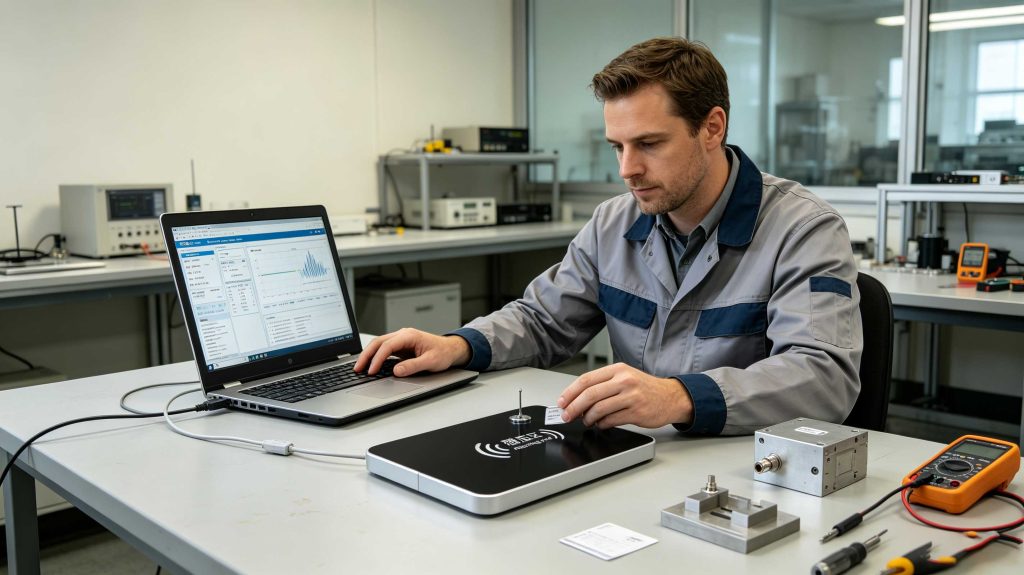 RFID reader programming combines hardware configuration, SDK integration, and real-world performance testing.
Recommended tests include:
The testing process should include real tags, not only simulation tools.
RFID performance depends heavily on physical conditions. GS1 notes that read range and RFID performance are influenced by tag type, antenna characteristics, environment, and reader configuration.
This is why experienced RFID engineers avoid configuring a reader only from a datasheet.
The final environment decides whether the programming is correct.
Connect reader → configure parameters → read tags → send data.
The difficult part appears when the reader meets reality.
A warehouse has moving forklifts.
A factory has vibration and interference.
A hospital asset room has strict access requirements.
A retail environment has dense product shelves.
The programming must respect those conditions.
For Cykeo RFID solutions, reader programming is designed around the complete system: hardware configuration, software integration, tag identification, and application requirements.
The goal is not only to make the reader communicate.
The goal is to make RFID data useful.
Programming an RFID reader is not simply sending a command to “start reading tags.” In a production RFID project, the reader becomes a communication bridge between physical objects and software systems. The configuration determines how tags are detected, how often data is reported, how duplicate reads are handled, and how the application interprets each RFID event.
During RFID deployments, I have found that many integration problems are not caused by the reader hardware itself. They usually appear at the connection point between the reader settings and the business workflow. A warehouse reader may capture thousands of tag observations, but the inventory system only needs meaningful events. A tool-management reader may detect a tagged tool, but the software must know whether it represents borrowing, returning, or an unauthorized movement.
That difference is where professional RFID programming begins.
According to the GS1 RFID standards ecosystem, RFID systems involve multiple layers, including tag identification, reader communication, middleware processing, and event-level data exchange. Standards such as EPC Gen2 / ISO 18000-63 and EPCIS help create interoperability between RFID hardware and business applications.
Understanding RFID reader programming before configuration
RFID reader programming includes several technical layers
A complete RFID reader setup usually involves:| Programming Layer | Purpose | Common Configuration |
|---|---|---|
| Communication layer | Connect reader with software | USB, RS-232, Ethernet, TCP/IP |
| RF configuration | Control wireless performance | Output power, frequency, antenna ports |
| Inventory command | Control tag scanning | Start, stop, continuous inventory |
| Tag filtering | Reduce unnecessary data | EPC filtering, duplicate removal |
| Data processing | Convert reads into events | Time stamps, reader location |
| Application interface | Connect business software | SDK, API, middleware |
In reality, RFID readers are usually tuned during commissioning. The correct output power for a warehouse doorway may be completely different from a desktop registration station. A reader mounted beside metal shelving may require different antenna settings than one installed in an open area.
How to program a UHF RFID reader step by step
1. Establish the communication connection
The first programming step is communication.Depending on the RFID reader model, developers may connect through:
- USB communication
- Serial communication
- Ethernet
- TCP/IP network
- Wireless communication interface
- Reader recognition
- Communication speed
- Network address
- Port availability
- Data transmission stability
2. Configure reader operating parameters
After communication is established, configure the reader according to the application.Typical parameters include:
- Reader output power
- Frequency region
- Antenna selection
- Reading mode
- Session parameters
- Inventory timing
- Tag filtering rules
For example, a warehouse portal may require:
- Multiple antenna operation
- Fast inventory scanning
- Strong anti-collision processing
- Event filtering
- Short reading distance
- Controlled writing area
- Stable single-tag operation
RFID reader command programming and SDK integration
Use manufacturer SDKs for application development
Professional RFID deployments rarely communicate with readers using raw commands only.Manufacturers typically provide:
- SDK libraries
- API documentation
- Demo software
- Development examples
- Communication protocols
- Connecting and disconnecting readers
- Starting inventory scans
- Reading EPC data
- Writing tag memory
- Setting reader parameters
- Receiving tag callbacks
- Managing multiple antennas
For example, a warehouse application may use the reader SDK like this:
Application Software
↓
RFID SDK/API
↓
RFID Reader Driver
↓
Reader Hardware
↓
RFID Tags
The reader does not decide the business meaning. The software layer does.
A tag read event becomes useful only after the application understands:
- Which reader detected it
- Where that reader is installed
- When the event happened
- What business process it represents
Common RFID reader programming challenges
Duplicate tag reads
One of the first issues developers encounter is repeated EPC data.A fixed reader scanning a pallet may report the same tag dozens of times within seconds.
The solution usually involves:
- Duplicate filtering
- Read-time windows
- Middleware rules
- Application-level event processing
Incorrect read zones
A reader may successfully detect tags but still fail operationally.Example:
A warehouse shipping door reader detects:
- The pallet leaving the warehouse
- Pallets waiting nearby
- Inventory stored beside the door
Communication instability
Industrial environments may contain:- Network interruptions
- Electrical noise
- Multiple readers operating nearby
- Heavy data traffic
Testing RFID reader programming after configuration
A programmed reader should always be validated using the final application scenario.Recommended tests include:
| Test | Purpose |
|---|---|
| Single-tag test | Verify basic communication |
| Multi-tag test | Confirm anti-collision performance |
| Distance test | Validate read range |
| Write test | Confirm memory programming |
| Movement test | Simulate real workflow |
| Integration test | Verify software communication |
| Long-running test | Check system stability |
RFID performance depends heavily on physical conditions. GS1 notes that read range and RFID performance are influenced by tag type, antenna characteristics, environment, and reader configuration.
This is why experienced RFID engineers avoid configuring a reader only from a datasheet.
The final environment decides whether the programming is correct.
Practical insight from RFID implementation projects
A reliable RFID reader program is usually simple on paper:Connect reader → configure parameters → read tags → send data.
The difficult part appears when the reader meets reality.
A warehouse has moving forklifts.
A factory has vibration and interference.
A hospital asset room has strict access requirements.
A retail environment has dense product shelves.
The programming must respect those conditions.
For Cykeo RFID solutions, reader programming is designed around the complete system: hardware configuration, software integration, tag identification, and application requirements.
The goal is not only to make the reader communicate.
The goal is to make RFID data useful.