
RFID reader is an electronic device that communicates with radio-frequency identification (RFID) tags to retrieve identification data and, when supported, write information to compatible tags. It uses an antenna and radio-frequency circuitry to exchange signals with tags, then passes the captured data to software or a connected system for processing.
A typical RFID reading process involves four stages:
This distinction becomes important when designing an RFID installation. A reader can successfully capture a tag identifier, but the inventory system may still need to validate the record, check permissions, or update the item’s status.
Not every RFID reader supports every tag. Frequency and protocol compatibility must be checked before selecting equipment. A reader designed for 13.56 MHz HF tags, for example, cannot automatically read UHF tags simply because both use RFID technology.
For warehouse applications, testing should use actual cartons and realistic movement speeds. A reader that performs well with stationary tags on a workbench may behave differently when tags are mounted at different angles or surrounded by metal shelving.
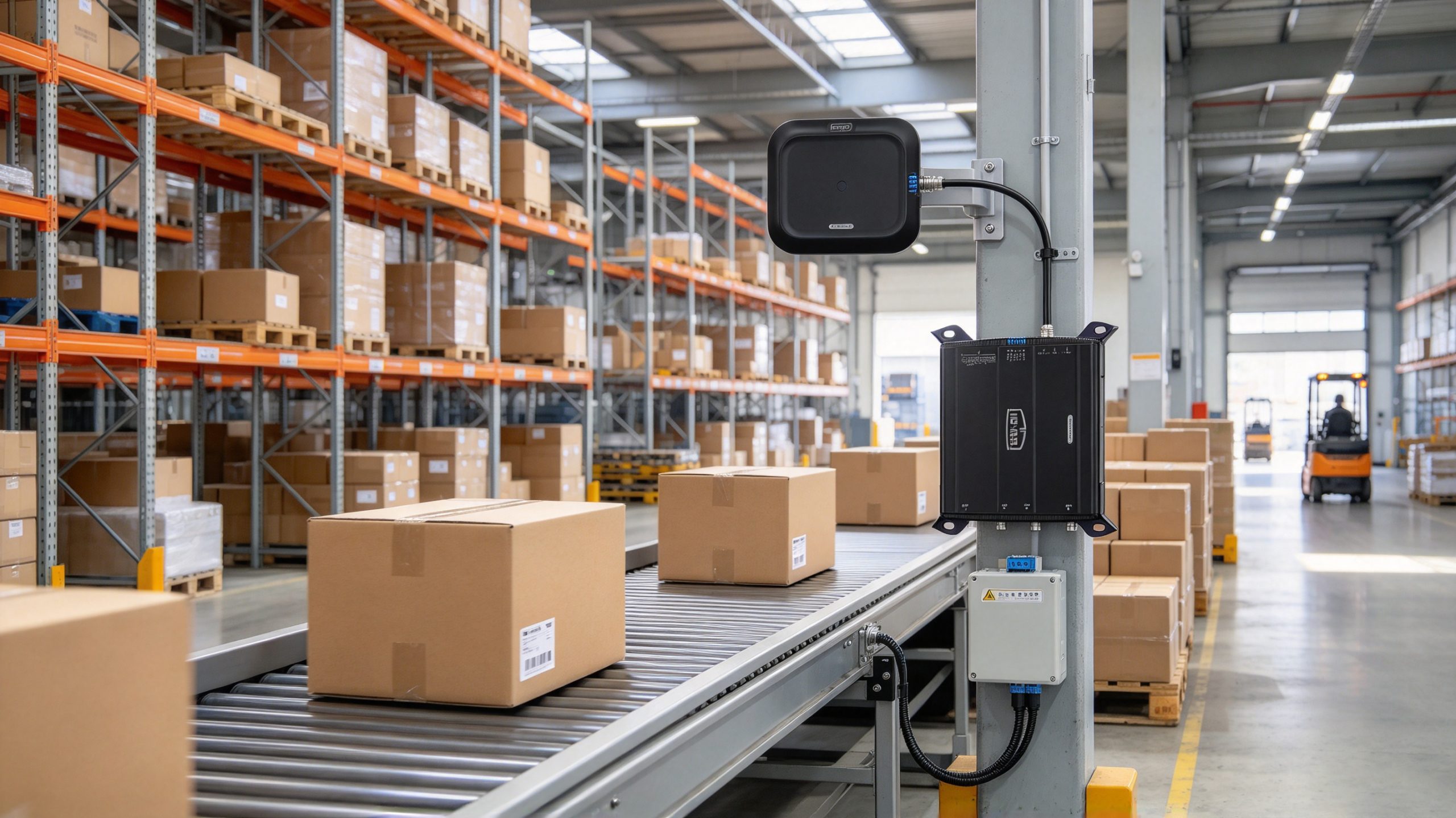 Fixed RFID readers capture tag data as goods move through a defined reading zone.
Also check the available software development kit (SDK), application programming interface (API), communication protocol, and diagnostic tools. These features affect how easily the reader can be integrated into an existing warehouse or manufacturing system.
 Verify tag compatibility, data transfer, and reading reliability before deploying an RFID reader.
GS1’s RFID architecture documentation distinguishes communication between readers and tags from the software interfaces that manage captured data. Its Low Level Reader Protocol (LLRP) provides a standard interface for controlling compatible readers, helping integrators build more portable applications.
How Does an RFID Reader Work?
An RFID reader identifies tagged items without requiring a camera to see a printed code or an operator to scan each label manually. Depending on the system, it can read one tag at close range or identify multiple tags within a larger reading zone.A typical RFID reading process involves four stages:
- Signal transmission: The reader generates a radio-frequency signal through its antenna.
- Tag response: A compatible passive tag uses the reader’s energy to respond, while active RFID systems operate using their own tag power source.
- Data capture: The reader receives and decodes the tag’s response.
- Data transfer: The reader sends the captured information to a computer, controller, or management platform.
This distinction becomes important when designing an RFID installation. A reader can successfully capture a tag identifier, but the inventory system may still need to validate the record, check permissions, or update the item’s status.
What Are the Main Types of RFID Readers?
The right reader depends on the required reading distance, operating environment, tag frequency, and workflow.| RFID reader type | Main characteristics | Typical applications |
|---|---|---|
| Fixed RFID reader | Installed at a defined location; may support external antennas | Warehouse portals, conveyor systems, production lines |
| Handheld RFID reader | Portable device for mobile scanning and inventory work | Stocktaking, asset audits, field operations |
| Desktop RFID reader | Compact device for controlled, close-range operations | Card encoding, tag registration, item management |
| Integrated RFID reader | Combines reader electronics and antenna in one unit | Compact industrial installations and equipment monitoring |
| RFID OEM module | Reader electronics designed for integration into another product | Embedded equipment, custom terminals, specialised devices |
What Specifications Matter When Choosing an RFID Reader?
A reader’s advertised read distance is only one part of its performance. In an actual installation, antenna design, tag orientation, nearby materials, and the required reading speed can be just as important.Frequency and protocol compatibility
Common RFID frequency categories include LF, HF, and UHF. GS1’s EPC UHF Gen2 standard defines air-interface communication for compatible UHF RFID systems used in applications such as supply-chain identification. Before purchasing a reader, confirm that its supported frequency band and protocol match the tags already in use.Antenna configuration and reading performance
A fixed reader may use an integrated antenna or connect to external antennas positioned around a conveyor, doorway, or storage area. Antenna placement determines which tags enter the reading zone.For warehouse applications, testing should use actual cartons and realistic movement speeds. A reader that performs well with stationary tags on a workbench may behave differently when tags are mounted at different angles or surrounded by metal shelving.
Interfaces and software integration
Industrial readers may provide interfaces such as Ethernet, RS-232, USB, or wireless connectivity, depending on the model. The right choice depends on the host computer, programmable controller, network design, and application software.Also check the available software development kit (SDK), application programming interface (API), communication protocol, and diagnostic tools. These features affect how easily the reader can be integrated into an existing warehouse or manufacturing system.
How to Select an RFID Reader for Your Application
Before choosing equipment from Cykeo, identify the task the reader must perform:- Warehouse inventory: Consider fixed UHF readers when goods must be identified as they move through a defined zone.
- Mobile stocktaking: Consider handheld readers for operators who need to move between shelves and assets.
- Card or tag registration: A desktop reader may be more suitable for controlled, close-range operations.
- Embedded equipment: An OEM RFID module can support integration into a specialised product or industrial device.
Common RFID Reader Problems and How to Solve Them
An RFID reader can power on and communicate with a computer yet still fail to deliver the expected results. Troubleshooting should separate radio-frequency performance from software and network issues.| Problem | Possible cause | What to check |
|---|---|---|
| Reader cannot detect tags | Frequency or protocol mismatch | Confirm that the reader and tags are compatible |
| Reading distance is too short | Antenna positioning, tag orientation, or unsuitable tags | Test with a known-compatible tag and adjust the setup |
| Too many unwanted tags are detected | Reading zone is too broad or power is too high | Adjust antenna direction and permitted power settings |
| Reader detects tags but software shows no data | Communication or application configuration issue | Check interface settings, SDK/API configuration, and data format |
| Tags are missed on a moving conveyor | Insufficient read opportunity or poor antenna placement | Test at normal operating speed and reposition the antenna |
| Reader disconnects intermittently | Power supply, cabling, or network instability | Inspect connections, power requirements, and network status |
A practical troubleshooting sequence
When a reader misses tags, start with a simple test rather than changing several settings at once.- Test one known-compatible tag at a short distance.
- Confirm the reader’s frequency, protocol, and regional configuration.
- Verify antenna connections and reader power.
- Check whether the reader reports the tag identifier correctly.
- If the identifier appears at the reader but not in the application, inspect the data interface and software configuration.
- Repeat the test with the actual products, packaging, and operating speed.